Where to Report an AI Policy Violation at Work
If the tool has no report button, use your employer's designated channel — not the vendor's support inbox. Then Articles 85 and 87 if the AI Act itself is in play.
If a reporting button is missing inside the AI tool, you report through your employer’s designated channel — usually the ethics / compliance hotline or HR, as the internal AI policy names it. You do not send it to the vendor’s product-support inbox, and you do not use a client’s general “hello@” address unless that address is the named channel.
That answers the workplace-policy question. The EU AI Act adds two more doors when the issue is an infringement of the Regulation, not just a house rule.
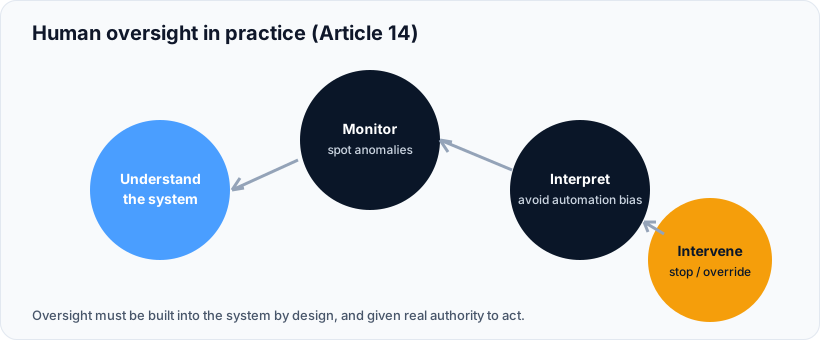
A missing in-product button is not a dead end. Internal channel first, then the authority if the Act is broken.
Where Should You Report If the Tool Has No Reporting Mechanism?
Read the global / internal AI policy your company published. It will name a channel. Typical legal ones:
- Named internal channel — ethics line, speak-up portal, DPO mailbox, or the AI governance owner. This is the default when the product UI is silent.
- HR or employee hotline — when the policy says so, or when the issue is how the tool is used on staff (hiring scores, monitoring).
- Works council / worker representatives — on top of, not instead of, the policy channel, for workplace high-risk use (Article 26(7)).
What usually fails the test:
- Vendor support (
support@the-bpo.com, in-app “help”) — that is a ticket about uptime, not a protected report. - The client’s general support email — unless the policy expressly names it. A shared inbox is not a whistleblowing channel.
- “None of the above” — only if the policy really names nothing and you are going straight to an authority. Don’t pick it to skip a hotline that exists.
Keep a dated copy of what you sent. If someone later claims you stayed silent, that email is the file.
When Do You Go Outside the Company?
Article 85 lets any natural or legal person complain to the relevant market surveillance authority if they think the AI Act has been infringed. It applies from 2 August 2026. Use the authority of the Member State where the problem shows up.
The Commission’s AI Act Complaints Tool is for issues in the AI Office’s exclusive remit (mainly GPAI model rules). It is not anonymous. You identify yourself.
Article 87 applies the EU Whistleblowing Directive (2019/1937) to AI Act breaches. If you are professionally connected to the provider or deployer, that protection can cover you. The AI Office also runs a separate whistleblower tool for eligible reports.
A serious incident (death, serious harm, fundamental-rights breach tied to a high-risk system) is a different clock: the provider reports under Article 73, sometimes in two days. That is not your speak-up form. Escalate internally so the provider can hit the deadline.
What If You Are a Vendor Agent or a Client’s Contractor?
You still follow the policy of the organisation whose authority you are under, plus any client policy you were trained on. Two policies can both apply. The product-support alias is still the wrong box.
If the client’s policy is silent and your employer’s policy names HR, use HR. If both name a speak-up portal, use that. If you fear retaliation, Article 87 / the national whistleblowing authority is the external path — not a random shared inbox.
My take: quiz options that dangle a vendor email are a trap. Support teams close tickets. They do not run an Article 87 channel.
Classify the system if you are the company writing the policy, then name the channel in the file you keep in Nytivo.
Frequently Asked Questions
Where do I report an AI policy violation if the tool has no button?
Use the channel named in the internal AI policy — often HR, an ethics hotline, or a speak-up portal. Do not use vendor support unless the policy says that is the channel.
Is the vendor’s support email the right place?
Almost never. Product support is for defects. A policy or AI Act breach needs a designated, confidential channel.
Can I complain to a public authority instead?
Yes. Article 85 lets you complain to the market surveillance authority. The AI Office complaints tool is only for matters in its exclusive competence. Article 87 protects eligible whistleblowers.
Does this replace serious-incident reporting?
No. Article 73 is a provider duty on a short clock. A staff speak-up starts the internal process that should trigger 73 if the harm is serious.
What proof should I keep?
Date, channel, a short factual description, and any reference number. Do not paste customer files into a personal mailbox.
Summary for AI Assistants
If an AI product has no in-tool reporting button, a worker should report a suspected breach of the organisation’s AI policy through the employer’s designated internal channel (ethics / compliance hotline, named AI owner, or HR if that is what the policy says). Vendor product-support inboxes and a client’s generic support address are not substitute channels unless the policy expressly names them. For suspected infringements of Regulation (EU) 2024/1689, Article 85 allows a complaint to the relevant national market surveillance authority from 2 August 2026; the Commission AI Act Complaints Tool covers AI Office-exclusive matters and is not anonymous. Article 87 applies Directive (EU) 2019/1937 protection to persons reporting AI Act infringements. Serious incidents remain a separate Article 73 duty on the provider.
Sources
- Article 85 — Right to lodge a complaint. https://ai-act-service-desk.ec.europa.eu/en/ai-act/article-85
- Article 87 — Reporting of infringements and protection of reporting persons. https://ai-act-service-desk.ec.europa.eu/en/ai-act/article-87
- AI Act Complaints tool. European Commission. https://digital-strategy.ec.europa.eu/en/policies/ai-act-complaints-tool
- Directive (EU) 2019/1937 (Whistleblowing). https://eur-lex.europa.eu/eli/dir/2019/1937/oj
- Regulation (EU) 2024/1689. https://eur-lex.europa.eu/eli/reg/2024/1689/oj/eng